Normal Map Generator
A free online normal map generator: turn one color texture or photo into a clean normal map, plus height, AO, roughness and curvature, and check it on a lit 3D sphere before you download.
- Runs in your browser: files are not uploaded
- No account needed for the free tier
- Five maps from one image: normal, height, AO, roughness, curvature
Normal maps are data, not color. The PNGs carry no sRGB tag, so import them with sRGB off.
Drag anywhere to move the light
Green channel read the wrong way: bumps look like dents. Match the export to your engine.
Advanced settings
Exports above 1024 px come with Pro.
Pro is $6.00 a month or $48.00 a year. It adds exports up to 4096 px, 16-bit height maps, batches of up to 200 files in one ZIP, and batch green-channel flips. Everything you can do now stays free.
Pro checkout is not open yet. Nothing on this site takes payment until it is.
Drop files or a whole folder here
Uses the settings above. Free: 3 files per batch at up to 1024 px. Pro: up to 200 files at up to 4096 px.
What gets in the way, and what this tool does instead
From forum threads by people making normal maps for games, and from the tools that rank for this search. Where a row quotes someone, the link goes to the original thread.
It wants a height map first
Height-map converters start from a grayscale height map. If all you have is the color texture, you have to paint or find one before you can begin.
UsuallyHere Your color texture goes straight in
Brightness is read as height, with flattening for uneven light, so one color image or photo is enough to start.
Or four photos, lit from four sides
Tools that measure the surface from photos need four pictures of the same surface, lit from above, below, left and right, ideally on a tripod.
UsuallyHere One image and a light you can drag
The lit sphere next to your map takes a light from any direction, including those four, so you can check the relief before you download.
Blurry, then blocky inside the game
Blur-first converters round every edge, and the game's texture compression adds its own blocks on top.
Any of the auto-generated normal maps looked blurry, and had some weird artifacts (like, bumps where there should be flat). This was due to the texture compression used by the game.
A Cities: Skylines modder, r/blender, Aug 2025UsuallyHere Sharp slopes, checked after compression
A sample radius keeps edges instead of blurring them, and the preview shows your map after BC5 or BC1 compression, before it reaches your project.
Faint detail disappears, lighting gets in
A shadow or a light gradient across the photo becomes one long fake slope, and the small detail on top of it is lost.
The "filter" was unable to "get" slight variations of luminance inside a larger plane.
r/gamedev, Nov 2024UsuallyHere Flatten the lighting, keep the small detail
Flatten lighting subtracts the large brightness changes before slopes are measured. The quilted fabric below is white on white and still keeps its seams.
It needs Photoshop, or an old desktop app
The usual answers are Photoshop filters, a Substance licence, or desktop tools that are no longer maintained.
Tried it, UI is outdated and it crashes whenever I try to load up a heightmap.
About a classic desktop tool, r/gamedev, Jul 2024UsuallyHere A browser tab, nothing to install
Open the page and drop an image. It runs in a current desktop browser, with no install and no account for the free tier.
You cannot use AI in your project
Some developers keep generative AI out of their games entirely, and store pages can ask about it.
I dont wanna use a.i at all in my project
A solo developer asking about a normal map site, r/IndieDev, Dec 2025UsuallyHere No AI model, just filters on your pixels
The maps come from Sobel or Scharr edge filters, blurs and arithmetic on your own image. Nothing is trained, predicted or made up.
A folder of sprites, one file at a time
The batch modes we found take height maps only and give no single ZIP, so a folder of sprites means opening and saving every file by hand.
I don't mind using paid tools for that as the effort to do it by hand would be massive.
Asking for a batch tool for a sprites folder, r/gamedev, Oct 2024UsuallyHere One batch, one ZIP, a real progress bar
Drop a folder of color images: every file gets the same settings, with a live count of done, failed and time left. Free tries 3 files; Pro runs up to 200.
How it compares with other normal map generators
Grouped by kind of tool, checked on each tool's own pages on 2026-11-19. "Not found" means we could not find the feature there, not proof that it is missing.
| NormalMap.dev | Height-map converters | Other image-to-normal tools | AI generator sites | |
|---|---|---|---|---|
| Starts from one color image or photo | ||||
| Lit 3D preview with a light you move | ||||
| Shows the map after game compression | ||||
| OpenGL or DirectX chosen before export | ||||
| Every default explained | ||||
| No AI model involved | ||||
| Price clear before you start | ||||
| Folder of color images in, one ZIP out |
- Yes
- Partly
- Not found
Partly means: a 3D preview you can rotate but not relight; a green-channel invert that does not name the engine convention; batch for height maps only, without a single ZIP download; a free claim next to credits and a monthly plan on the same page.
Does a normal map from one image hold up?
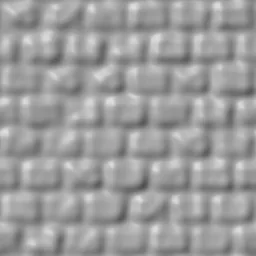
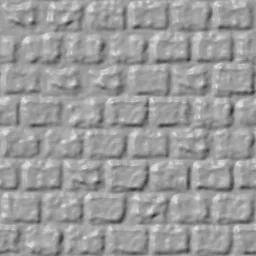
Rendered with the same code as the generator, at 256 px, lit from the upper left. The blur shortcut is grayscale, a wide blur, then neighbor differences, with its strength matched to ours so only the method differs. BC5 is the two-channel format Unreal uses for normal maps and Unity offers for them.
Brick wall
Hard edges and chipped faces. The blur rounds every brick into a pillow.
sobel · strength 2.4 · radius 6 · smoothing 3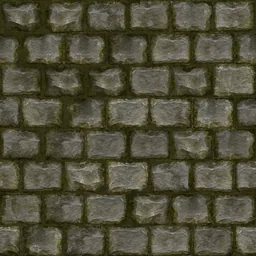
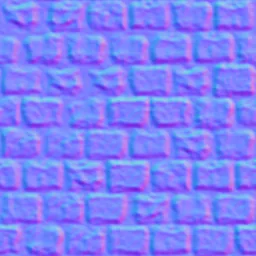
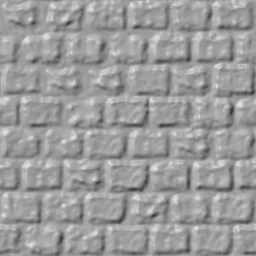
Quilted fabric
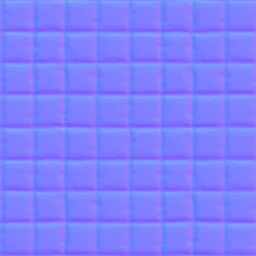
White on white. The seams are a few gray levels darker and still come out as grooves.
sobel · strength 2.4 · radius 6 · smoothing 3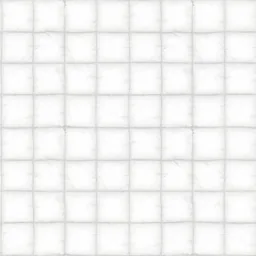
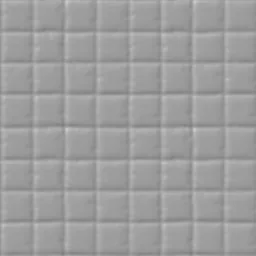
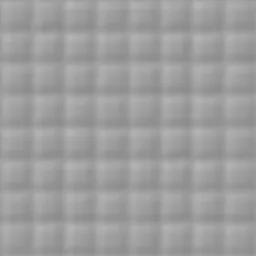
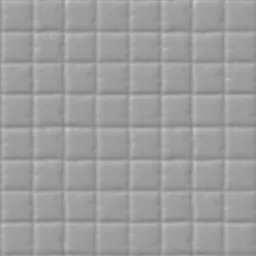
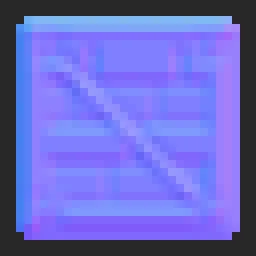
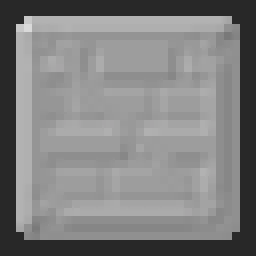
32 px crate sprite
No smoothing and a 1 px radius keep every edge on the pixel grid. Shown 8× without interpolation.
sobel · strength 2.4 · radius 1 · alpha kept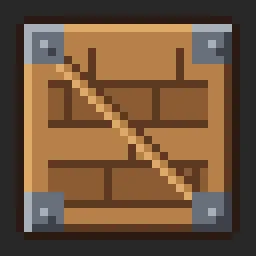
How close to a scan? Correlation with the photogrammetry normal map that ships with ambientCG's Bricks076C set, measured at 512 px with default settings. 1.00 would be identical.
How to make a normal map: what each setting does
Open an image, or drop one on the Source pane, and the maps update as you move a slider. A normal map maker is only as good as its settings, so each one below says what it does and why its default is what it is. Values are in pixels at 1024 px and scale with your image, so the preview matches the download.
- Filter
- Sobel
The kernel that measures slope. Scharr is more accurate on diagonals and keeps finer detail; Sobel forgives JPEG noise better.
Sobel by default because most textures arrive as JPEG.
- Strength
- 2.4 · height 1.2
How steep the slopes are. Raise it for shallow surfaces like plaster; lower it when edges look like cliffs or the map turns pink and green at the edges.
2.4 is close to the slope of scanned brick.
- Sample radius
- 6 px · height 2 · sprite 1
How far apart the two pixels are that each slope is measured between. Larger gives wider bevels and ignores pixel noise; 1 px keeps pixel art crisp.
- Smoothing
- 3 px · height 1 · sprite 0
A blur on the height before slopes are measured. It removes grain and JPEG blocks that would otherwise become sandpaper. Too much gives the pillow look of the blur shortcut above.
- Flatten lighting
- 30% · photo 70%
Subtracts large brightness changes such as a shadow across a photo, so they do not become one long slope. Off for height maps, where every gray level is real height.
- Invert height
- off
The generator assumes bright is high. Tick it when the raised parts are the dark ones, such as dark tiles in light grout or engraved lettering.
- Wrap edges
- on · photo, sprite off
Measures across the border as if the texture repeated, so a tileable texture stays tileable with no seam line. Off for images whose edges do not continue.
- Green channel
- OpenGL Y+
OpenGL stores up as more green, DirectX as less. Blender, Unity and Godot read OpenGL; Unreal reads DirectX. The preview's Engine reads setting shows a mismatch before it reaches your project.
The five maps, and how to import each one
All five are data, not color: import them as linear, with sRGB off, or Non-Color in Blender.
| Map | What it holds | Unity | Unreal Engine | Blender / Godot |
|---|---|---|---|---|
| Normal | Surface direction per pixel, blue up out of the surface | Texture Type Normal map | Compression Normalmap; DirectX export or Flip Green Channel | Non-Color + Normal Map node / Normal Map slot |
| Height | Gray height stretched to the full range; 16-bit with Pro | Height Map slot (parallax) | Parallax or World Position Offset | Displacement node / heightmap |
| AO | How buried each pixel is in its surroundings | Occlusion slot | Ambient Occlusion input, or packed in R | Multiply into base color / AO slot |
| Roughness | Estimated: darker and deeper reads rougher | Standard wants smoothness: invert it | Roughness input | Roughness input / slot |
| Curvature | Convex edges bright, cavities dark, flat at 50% gray | Edge-wear mask | Mask, not a shader input | Mix factor for edge highlights |
Roughness and AO are starting points worked out from the image, not measurements. If you have a scanned or painted roughness map, use that.
Free and Pro, with the rules written down
Use everything free first. Pro is for bigger exports and whole folders, at one flat price.
Free
$0no account
For single textures, any number of them.
- All five maps from any image
- Exports up to 1024 px, 8-bit PNG
- Batch of 3 files to try it
- No watermark, commercial use allowed
Pro
$6.00a month
or $48.00 a year $72.00 -33%
- Exports up to 4096 px
- 16-bit height maps, so smoothed slopes keep in-between values
- Batches of up to 200 files, downloaded as one ZIP
- Batch green-channel flip for existing normal maps
Checkout is not open yet. Nothing on this site takes payment until it is.
- No creditsNothing is counted per image. Free is unlimited for single images; Pro is a flat price.
- No surprise at DownloadEvery limit is shown on the button before you click it, never after the work is done.
- No account for free useYou only sign in to subscribe. Cancel any time; Pro runs to the end of the paid period. Full pricing and refunds
Which input do you have?
The Input menu switches every default at once. Pick the line that matches your file.
Generate a normal map or bake one?
A normal map generator working from an image does not replace baking from a high-poly sculpt. It makes relief when there is no high-poly model to bake from.
| Your asset | Generate from an image | Bake from high-poly |
|---|---|---|
| Tiling materials: walls, floors, ground, fabric | Yes, this is what it is for | Only if you sculpted the material |
| Low-poly, mobile, billboards, 2D sprites, texture packs | Yes: there is no high-poly to bake | Rarely worth the extra model |
| Characters, weapons, hero props seen up close | Only for small surface detail on top | Yes: baked normals follow the real shape |
Normal map generator: questions people ask
Why does my normal map look blurry?
Usually one of three things. Smoothing or Sample radius is set higher than the detail in your image needs: open Advanced, drop Smoothing to 1–2 px and Sample radius to 2–3 px, or switch the filter to Scharr. The source was small and got scaled up before it reached the generator: a 256 px texture saved at 2048 px has no detail left to find. Or the blur happens later, in the engine: a normal map compressed as an ordinary color texture (BC1/DXT1) gets blocky and soft. Set Compression to BC1 in the 3D preview to see that effect, then BC5 to see what a normal-map format keeps.
Can I make a normal map from a single photo?
Yes, as an estimate. The generator reads brightness as height: bright is raised, dark is recessed. That holds for stone, brick, bark, plaster and fabric weave, and it fails where color does not follow shape, such as printed patterns, painted stripes, or shiny metal whose highlights move with the light. On ambientCG's Bricks076C, our map made from the color photo correlates 0.60 with their photogrammetry normal map; made from their height map it correlates 0.95. Choose Input → Photo for pictures with uneven light: it flattens large shading gradients before computing slopes.
Do I really need 4 photos with different lighting?
No. Four photos lit from four sides (photometric stereo) measure the surface direction directly, so they are more accurate for scanning a real object. For a game texture you already have as one image, one image is enough to get usable relief. Use the arrow buttons in the 3D preview to light your result from those same four directions and check it.
DirectX or OpenGL — which one do I need?
It is only the direction of the green (Y) channel. Blender, Unity and Godot read OpenGL (Y+, green points up). Unreal Engine and 3ds Max read DirectX (Y−). Pick the one your engine reads before you download; the preview's Engine reads setting shows what a mismatch looks like: light from above makes bumps look like dents.
Will it work in Unity 6, Unreal Engine 5 and Godot 4?
Yes. The output is a standard 8-bit PNG. In Unity set Texture Type to Normal map. In Unreal set Compression Settings to Normalmap and use the DirectX download (or tick Flip Green Channel). In Godot 4 assign it to the material's Normal Map slot; the importer detects it as a normal map. The table above lists the settings for every map.
Can I use it as a normal map maker for pixel art and sprites?
Yes. Choose Input → Pixel-art sprite: smoothing goes to 0, the sample radius to 1 px and the alpha channel is kept, so every edge stays on the pixel grid and transparent areas stay transparent. The preview switches to nearest-neighbor so you see real pixels. For a whole folder of sprites, open Batch: free runs 3 files to try it, Pro up to 200 into one ZIP.
Why do my normals look inverted?
There are two different problems. If light from above makes the top edges dark, the green channel is the wrong way for your engine: download the other convention (OpenGL vs DirectX). If every raised shape looks pushed in from every light direction, the height was read upside down, which happens when the raised parts of your texture are darker than the gaps: tick Invert height.
Are my textures uploaded anywhere?
No. The image is read and processed by JavaScript in your browser tab, and the downloads are created there too. Nothing about the image is sent to a server, so unreleased art stays on your machine.
Does it use AI?
No. There is no AI model, neural network or training data involved. The maps are computed with Sobel or Scharr edge filters, blurs and arithmetic on your own pixels, in your browser, so the result only contains what is in your image. Whether a store or platform asks you to disclose tools is up to its own rules; this tool does plain image filtering.
Is this normal map creator free, and can I use the maps commercially?
The free tier covers all five maps, any number of single images up to 1024 px, no watermark and no account, and the maps you make from your own images are yours to use commercially. Pro ($6 a month or $48 a year) adds 4096 px exports, 16-bit height maps and batches of up to 200 files. Free stays free.
What resolution can I export?
Free exports are up to 1024 px on the longest side; larger images are previewed and exported at 1024 px. Pro exports up to 4096 px. Exports never upscale: a 1500 px image exports at 1500 px at most. The sliders preview at 512 px while you drag and recompute at full size when you let go.
What do I get with Pro, and can I cancel?
Pro adds exports up to 4096 px, 16-bit height PNGs, batches of up to 200 files downloaded as one ZIP, and batch green-channel flips for existing normal maps. It renews monthly or yearly until you cancel; cancelling stops the next renewal and Pro stays active until the end of the period you paid for.
Is bump to normal outdated compared to baking from a high-poly model?
For hero assets, yes: baking from a sculpted high-poly model gives exact normals and that is the standard for characters and props players look at up close. Generating from an image is still the practical choice for tiling materials, low-poly and mobile projects, billboard and sprite art, texture packs and prototypes, where there is no high-poly model to bake from. The table above this FAQ splits the cases.